Voice Translation API for Real-Time Speech

Palabra.ai gives you an out-of-the-box two-way speech-to-speech translation API. Powered by our own models, it delivers human-level accuracy with <1s latency.

Trusted by top teams worldwide

Advanced Voice Translation API for Global Communication

With higher accuracy. Faster. Easier. At scale.
Access 60+ languages
Translate between more than 60 languages. Couldn’t find your language? Reach out, and we’ll talk about adding it.
Arabic
Bulgarian
Chinese
Czech
Danish
Dutch
English
Finnish
French
German
Greek
Hebrew
Hindi
Hungarian
Indonesian
Italian
Japanese
Korean
Polish
Portuguese
Portuguese (Brazilian)
Romanian
Russian
Slovak
Spanish
Swedish
Turkish
Ukrainian

Language auto-detection

Palabra automatically detects and switches between languages in real time, even if a single speaker code-switches mid-conversation.
Access 60+ languages

Tone and context conveyed

By controlling the entire translation pipeline, Palabra can carry over key data from the original speech into the translated output. This preserves tone and conversational context throughout the process, with emotion delivery coming soon.
Interpret tone and meaning

Voice cloning out of the box

With Palabra, you can automatically generate synthetic voices for each speaker. No manual setup needed.
Translate speech from noisy environments

Speaker diarization (coming soon)

Palabra uses diarization to identify each speaker and assign a unique or cloned voice, so every translated speaker sounds distinct.
Use human voices

Ultra-low latency

Palabra delivers speech-to-speech translation in real time with less than a second delay. Predictive models tailored to each language pair cut lag, while full-stack control from ASR to TTS keeps every stage fast and efficient.
One subscription for the  organizer

Custom glossaries

Palabra lets you define custom terminology to keep translations accurate and consistent. In real-time sessions, the speech-to-speech translation API applies your glossary rules so key terms are recognized and translated exactly as defined.
Interpret tone and meaning

Enterprise-grade security

We encrypt all conversations and do not store voice data. For customers with advanced data security needs, Palabra supports deployments in private clouds or on-premises.

Feedback on our real-time
translation services

Saptarshi Chakraborty
Co-Founder & Product Owner at EventLabs

“At EventLabs, we rely on Palabra for real-time translation during conferences and live events. Among all the solutions we’ve tested, Palabra stands out with the highest translation quality and the lowest latency by a significant margin. The platform’s speaker autodetection, differentiating between male and female voices and adapting translations in real time, has noticeably improved the listener experience. For us, Palabra is setting the benchmark for event translation technology.”

Anton Selikhov
CEO at Talo AI

“We built our product entirely on the Palabra API and it’s been an incredible foundation for what we do at Talo. The API’s natural language processing capabilities are reliable and accurate, which allowed us to bring real-time translations and captions to our users without starting from scratch.”

Designed for what you build

Impress your speakers and guests with Live Translation powered by Palabra’s very own language models, offering state-of-the-art accuracy and small latency

Tech stack support
Real time speech-to-speech translation streaming API for speech interpretation.
Scalable for any use case
Translate your online streams into multiple languages in real-time.
Accurate in noisy environments
Create and manage custom voices for your Voices Collection.
Flexible deployment
Ensure accuracy for your industry with Palabra's
custom glossaries.

What Teams Build with Our Speech Translation API

Communication & Collaboration Platforms
to strengthen global reach with seamless multilingual interaction and higher user satisfaction. 
Global Call Centers & Customer Support Platforms
to scale multilingual support and win clients who serve global user bases. 
Entertainment & Streaming Platforms
to expand global audiences, drive engagement, and reduce translation or interpreter costs. 
Social Commerce Platforms
to increase sales conversion and global reach.

Integrate Real-Time Voice Translation API in a Few Lines of Code

Real-time speech translation
Add Palabra's world-class translation to your app in minutes with our intuitive API and ready-made client libraries

from palabra_ai import (PalabraAI, Config,
 SourceLang, TargetLang, EN, ES, DeviceManager)

palabra = PalabraAI('<API_CLIENT_ID>', '<API_CLIENT_SECRET>')
dm = DeviceManager()
mic, speaker = dm.select_devices_interactive()
cfg = Config(SourceLang(EN, mic), [TargetLang(ES, speaker)])
palabra.run(cfg)

Python Palabra SDK

import { PalabraClient, getLocalAudioTrack } from '@palabra-ai/translator';

const client = new PalabraClient({
 auth: {
   clientId: 'YOUR_CLIENT_ID',
   clientSecret: 'YOUR_CLIENT_SECRET',
 },
 translateFrom: 'en', // Source language code
 translateTo: 'es',   // Target language code  handleOriginalTrack: getLocalAudioTrack, // Func returning a MediaStreamTrack
});

JavaScript Palabra API Client

import ai.palabra.*;
import ai.palabra.adapter.*;

public class TranslationExample {
   public static void main(String[] args) {
       // Initialize client with credentials
       String clientId = System.getenv("PALABRA_CLIENT_ID");
       String clientSecret = System.getenv("PALABRA_CLIENT_SECRET");

       PalabraAI client = new PalabraAI(clientId, clientSecret);

       // Configure translation
       Config config = Config.builder()
           .sourceLang(Language.EN_US)
           .targetLang(Language.ES_MX)
           .reader(new FileReader("input.wav"))
           .writer(new FileWriter("output.wav"))
           .build();

       // Run translation
       client.run(config);
   }
}

Java Palabra API Client

Palabra API is compatible with any programming language that supports WebSockets or WebRTC protocols. Use our API Direct Integration solutuon to create integration with your server-side or client-side applications.

Learn more

How Our Speech to Speech Translation API Works in 4 Steps

HTML

1
2
3
4
5
6
7
8

<div class="app">
  <div class="transcription" />
  <div class="controls">
     <button id="start">Start</button>
     <button id="start">Stop</button>
  </div>
  <div class="translations" />
</div>

JavaScript

1
2
3
4
5
6
7
8
9
10
11
12
13
14
15
16
17
18
19
20
21

import { PalabraClient, getMicAudioTrack }
  from "palabra";

const client = new PalabraClient({
//   clientId: "<API_CLIENT_ID>",
//   clientSecret: "<API_CLIENT_SECRET>",
//   originalTrack: getMicAudioTrack(),
//   translateFrom: "en",
//   translateTo: "fr"

});

//   document.getElementById('start')
//     .addEventListener('click', () => {
//        client.startTranslation();
//        client.playTranslationTrack();
//   });

//   document.getElementById('stop')
//     .addEventListener('click', () => {
//        client.stopTranslation();
//    });

HTML

1
2
3
4
5
6
7
8

<div class="app">
  <div class="transcription" />
  <div class="controls">
     <button id="start">Start</button>
     <button id="start">Stop</button>
  </div>
  <div class="translations" />
</div>

JavaScript

1
2
3
4
5
6
7
8
9
10
11
12
13
14
15
16
17
18
19
20
21

import { PalabraClient, getMicAudioTrack }
  from "palabra";

const client = new PalabraClient({
      clientId: "<API_CLIENT_ID>",
    
  clientSecret: "<API_CLIENT_SECRET>",
//   originalTrack: getMicAudioTrack(),
//   translateFrom: "en",
//   translateTo: "fr"

});

//   document.getElementById('start')
//     .addEventListener('click', () => {
//        client.startTranslation();
//        client.playTranslationTrack();
//   });

//   document.getElementById('stop')
//     .addEventListener('click', () => {
//        client.stopTranslation();
//    });

HTML

1
2
3
4
5
6
7
8

<div class="app">
  <div class="transcription" />
  <div class="controls">
     <button id="start">Start</button>
     <button id="start">Stop</button>
  </div>
  <div class="translations" />
</div>

JavaScript

1
2
3
4
5
6
7
8
9
10
11
12
13
14
15
16
17
18
19
20
21

import { PalabraClient, getMicAudioTrack }
  from "palabra";

const client = new PalabraClient({
      clientId: "<API_CLIENT_ID>",
    
  clientSecret: "<API_CLIENT_SECRET>",
      
originalTrack: getMicAudioTrack(),
      
translateFrom: "en",
      
translateTo: "fr"
});

//   document.getElementById('start')
//     .addEventListener('click', () => {
//        client.startTranslation();
//        client.playTranslationTrack();
//   });

//   document.getElementById('stop')
//     .addEventListener('click', () => {
//        client.stopTranslation();
//    });

HTML

1
2
3
4
5
6
7
8

<div class="app">
  <div class="transcription" />
  <div class="controls">
     <button id="start">Start</button>
     <button id="start">Stop</button>
  </div>
  <div class="translations" />
</div>

JavaScript

1
2
3
4
5
6
7
8
9
10
11
12
13
14
15
16
17
18
19
20
21

import { PalabraClient, getMicAudioTrack }
  from "palabra";

const client = new PalabraClient({
      clientId: "<API_CLIENT_ID>",
    
  clientSecret: "<API_CLIENT_SECRET>",
      
originalTrack: getMicAudioTrack(),
      
translateFrom: "en",
      
translateTo: "fr"
});

document.getElementById('start')
      
.addEventListener('click', () => {
      
 client.startTranslation();
     
 client.playTranslationTrack();
    
});

‍document.getElementById('stop')
   
.addEventListener('click', () => {
       
client.stopTranslation();
   
 });
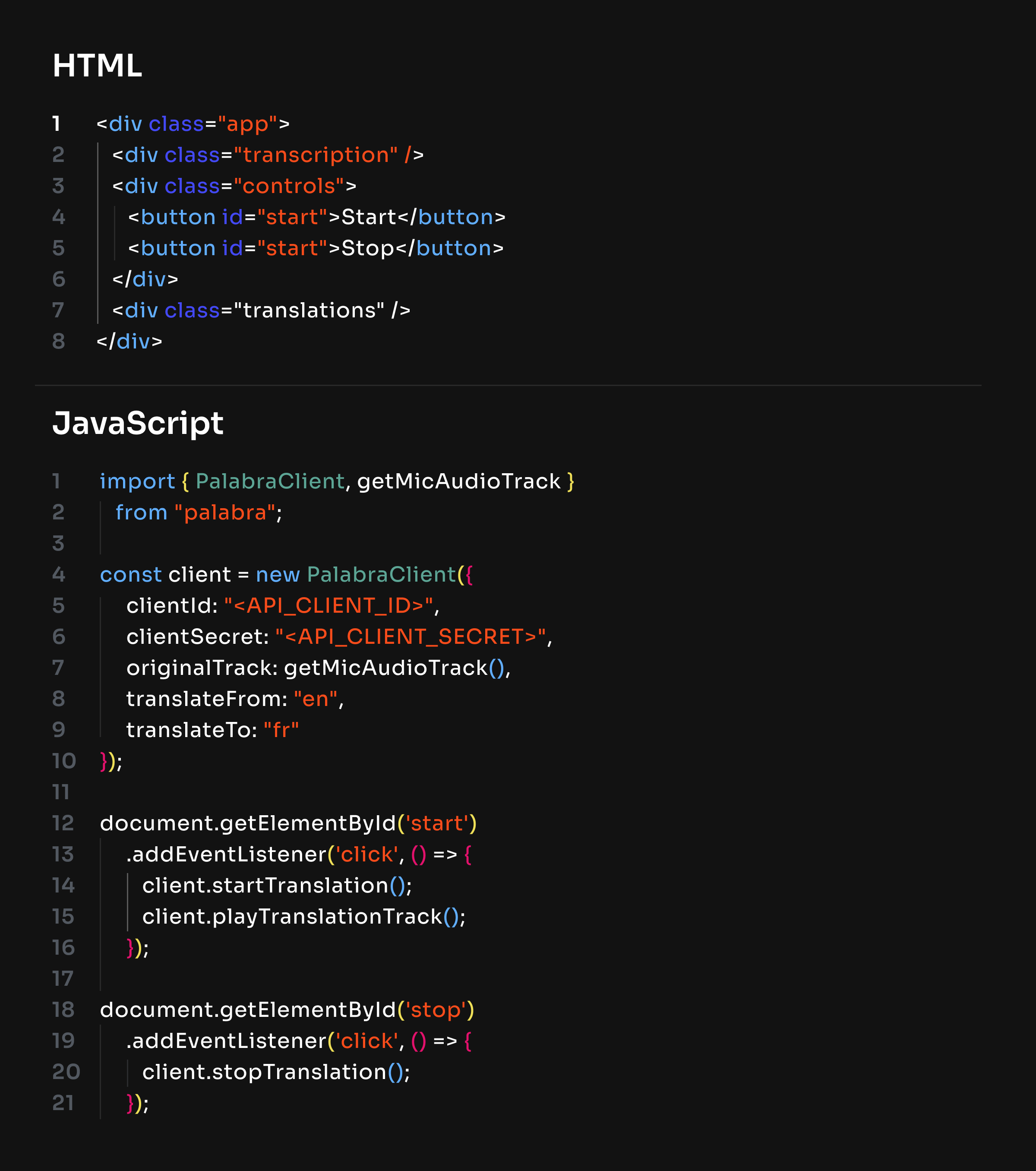
1
Import a read-made Palabra client.

HTML

1
2
3
4
5
6
7
8

<div class="app">
  <div class="transcription" />
  <div class="controls">
     <button id="start">Start</button>
     <button id="start">Stop</button>
  </div>
  <div class="translations" />
</div>

JavaScript

1
2
3
4
5
6
7
8
9
10
11
12
13
14
15
16
17
18
19
20
21

import { PalabraClient, getMicAudioTrack }
  from "palabra";

const client = new PalabraClient({
//   clientId: "<API_CLIENT_ID>",
//   clientSecret: "<API_CLIENT_SECRET>",
//   originalTrack: getMicAudioTrack(),
//   translateFrom: "en",
//   translateTo: "fr"

});

//   document.getElementById('start')
//     .addEventListener('click', () => {
//        client.startTranslation();
//        client.playTranslationTrack();
//   });

//   document.getElementById('stop')
//     .addEventListener('click', () => {
//        client.stopTranslation();
//    });

2
Drop your API keys.

HTML

1
2
3
4
5
6
7
8

<div class="app">
  <div class="transcription" />
  <div class="controls">
     <button id="start">Start</button>
     <button id="start">Stop</button>
  </div>
  <div class="translations" />
</div>

JavaScript

1
2
3
4
5
6
7
8
9
10
11
12
13
14
15
16
17
18
19
20
21

import { PalabraClient, getMicAudioTrack }
  from "palabra";

const client = new PalabraClient({
      clientId: "<API_CLIENT_ID>",
    
  clientSecret: "<API_CLIENT_SECRET>",
//   originalTrack: getMicAudioTrack(),
//   translateFrom: "en",
//   translateTo: "fr"

});

//   document.getElementById('start')
//     .addEventListener('click', () => {
//        client.startTranslation();
//        client.playTranslationTrack();
//   });

//   document.getElementById('stop')
//     .addEventListener('click', () => {
//        client.stopTranslation();
//    });

3
Pick your source and target languages.

HTML

1
2
3
4
5
6
7
8

<div class="app">
  <div class="transcription" />
  <div class="controls">
     <button id="start">Start</button>
     <button id="start">Stop</button>
  </div>
  <div class="translations" />
</div>

JavaScript

1
2
3
4
5
6
7
8
9
10
11
12
13
14
15
16
17
18
19
20
21

import { PalabraClient, getMicAudioTrack }
  from "palabra";

const client = new PalabraClient({
      clientId: "<API_CLIENT_ID>",
    
  clientSecret: "<API_CLIENT_SECRET>",
      
originalTrack: getMicAudioTrack(),
      
translateFrom: "en",
      
translateTo: "fr"
});

//   document.getElementById('start')
//     .addEventListener('click', () => {
//        client.startTranslation();
//        client.playTranslationTrack();
//   });

//   document.getElementById('stop')
//     .addEventListener('click', () => {
//        client.stopTranslation();
//    });

4
Wire up your UI (e.g., button click handlers).

HTML

1
2
3
4
5
6
7
8

<div class="app">
  <div class="transcription" />
  <div class="controls">
     <button id="start">Start</button>
     <button id="start">Stop</button>
  </div>
  <div class="translations" />
</div>

JavaScript

1
2
3
4
5
6
7
8
9
10
11
12
13
14
15
16
17
18
19
20
21

import { PalabraClient, getMicAudioTrack }
  from "palabra";

const client = new PalabraClient({
      clientId: "<API_CLIENT_ID>",
    
  clientSecret: "<API_CLIENT_SECRET>",
      
originalTrack: getMicAudioTrack(),
      
translateFrom: "en",
      
translateTo: "fr"
});

document.getElementById('start')
      
.addEventListener('click', () => {
      
 client.startTranslation();
     
 client.playTranslationTrack();
    
});

‍document.getElementById('stop')
   
.addEventListener('click', () => {
       
client.stopTranslation();
   
 });

Speak and hear translations in real time.
If you have any questions, please contact us
at [email protected] or book a demo call.

Real-time translation pricing, built around how you use it

Starter
For occasional multilingual calls, presentations, and B2B webinars.
$60
$45
/MO
Capacity
3 hours
Capacity
$20 / hour
$15 / hour
Start free trial
CORE FEATURES
60+ languages
Conversation mode (two-
way translation)
Presentation mode (one-to-many translation)
Custom glossaries
Voice cloning & Pre-recorded voices
Noise suppression & Music isolation
Live captions & transcripts
Pro
For regular multilingual meetings, webinars, and presentations.
$200
$150
$115
/MO
Capacity
10 hours
Capacity
$15 / hour
$11.5 / hour
Start free trial
MORE HOURS AND BETTER RATE THAN STARTER
60+ languages
Conversation mode (two-
way translation)
Presentation mode (one-to-many translation)
Custom glossaries
Voice cloning & Pre-recorded voices
Noise suppression & Music isolation
Live captions & transcripts
Team
For high-volume translation with the lowest self-serve rate.
$1000
$500
$375
/MO
Capacity
50 hours
Capacity
$10 / hour
$7.5 / hour
EVERYTHING IN PRO, PLUS:
Multi-seat workspace with roles & permissions
SSO & audit logs
Dedicated account manager
Setup help
Business
For tailored capacity, control, and enterprise-grade support.
Custom
Tailored volume prising
Talk to sales
EVERYTHING IN TEAM, PLUS:
Custom features and integration development
SLA and priority support
Security and procurement support
Enterprise onboarding
Regional server deploy
Starter
For occasional events and workshops you run yourself.
$500
$375
/MO
Capacity
5 hours
Capacity
$100 / hour
$75 / hour
Start free trial
CORE FEATURES
Unlimited listeners 
Single-stage events
2 cloned voices (+ accent control)
QR code audience access
Pre-recorded voices
Custom glossaries & context-aware delivery
Translated captions
Noise suppression & music isolation
Audio ducking / mixing
RTMP/SRT and HLS integration
Self-service setup
Pro
For regular events with multiple speakers and stages.
$2000
$1600
$1200
/MO
Capacity
20 hours
Capacity
$80 / hour
$60 / hour
EVERYTHING IN STARTER, plus:
Up to 3 stages per event
10 cloned voices (+ accent control)
Speaker diarization
Setup help
Team
For high-volume conferences across multiple organizers.
$5000
$3000
$2250
/MO
Capacity
50 hours
Capacity
$60 / hour
$45 / hour
EVERYTHING IN PRO, PLUS:
Unlimited stages per event
Unlimited cloned voices
Multi-seat workspace with roles & permissions
Dedicated account manager
Enterprise onboarding
Business
For global enterprises and institutions needing full control.
Custom
Tailored volume prising
Talk to sales
EVERYTHING IN TEAM, PLUS:
Custom features and integration development
SLA and priority support
Regional server deployment
Starter
For small live streams you set up yourself.
$300
$225
/MO
Capacity
5 hours
Capacity
$60 / hour
$45 / hour
Start free trial
CORE FEATURES
Unlimited listeners 
3 simultaneous output languages
2 cloned voices (+ accent control)
Live audio and captions translation (60+ languages)
RTMP/SRT and HLS integration
QR code audience access
Custom glossaries & context-aware delivery
Voice cloning & accent control
Pre-recorded voices
Noise suppression & music isolation
Audio ducking / mixing
Self-service setup
Pro
For regular broadcasts with growing global audiences.
$1200
$800
$600
/MO
Capacity
20 hours
Capacity
$40 / hour
$30 / hour
EVERYTHING IN STARTER, plus:
10 simultaneous output languages
10 cloned voices
More hours
lower per-hour cost
Speaker diarization
Team
For large-scale broadcasts with multiple producers and streams.
$3000
$1500
$1125
/MO
Capacity
50 hours
Capacity
$30 / hour
$22.5 / hour
EVERYTHING IN PRO, PLUS:
Unlimited simultaneous output languages
Unlimited cloned voices
Multi-seat workspace with roles & permissions
Dedicated account manager
Business
For global enterprises and institutions needing full control.
Custom
Tailored volume prising
Talk to sales
EVERYTHING IN TEAM, PLUS:
Custom features and integration development
SLA and priority support
Regional server deploy

Answers You Might Need

What industries can benefit most from a real-time voice translation API?

Industries that benefit most include customer service, enterprise software and collaboration, media and entertainment, and consumer apps.

How do I integrate the API into my existing application?

You can integrate Palabra API into your application by using our SDKs or connecting directly via WebRTC (for browsers) or WebSockets (for servers).

Which programming languages and SDKs are supported?

Palabra provides SDKs and client libraries for Python and JavaScript. For other languages, Palabra integrates through WebRTC (frontend) and WebSockets (backend).

Is HTML & XML handling supported for translation?

As a real-time speech-to-speech translation solution, Palabra supports audio input only.

Can I customize translations with a glossary?

Yes. Glossaries let you define how Palabra translates specific terms. Once enabled, your glossary applies across all Palabra applications and sessions.

How is data secured during and after translation?

All conversations are encrypted in transit and processed entirely in memory. Palabra does not store voice data on its servers ー once audio is translated, it is deleted.

Does the API store or log voice data?

No. By default, Palabra does not store or log user data, nor is user data used to train models.

Can the API be deployed in a private cloud or on-premises environment?

Yes. The Palabra API can run in a private cloud or on-premises, fully under your own security and compliance controls.

What audio does Palabra.ai support?

Palabra.ai WebSocket integration supports these input audio formats: Opus, PCM_S16LE, and WAV. For output, it supports PCM_S16LE and ZLIB_PCM_S16LE.

What is the maximum audio length supported per request?

Palabra processes real-time audio streams, which by default can run indefinitely.

How does the API maintain accuracy in noisy environments?

Palabra includes integrated noise suppression, so speech remains accurate even in noisy conditions. No additional preprocessing is required.